

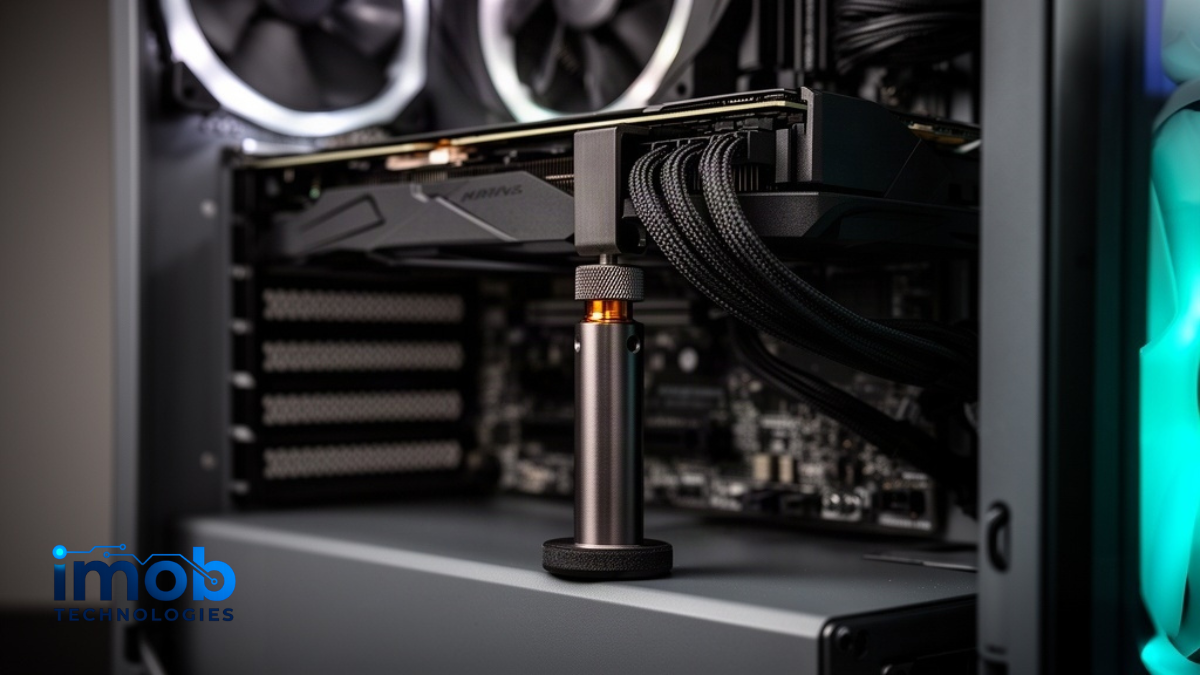
Before you buy a GPU sag bracket, open two boxes you have already paid for: the one your graphics card came in, and your case. ASUS bundles a graphics card holder with the ROG Astral RTX 5090, Gigabyte ships an anti-sag bracket with many of its cards and documents the fitment conditions, and some cases now arrive with an adjustable bracket already installed, like Lian Li’s Vector V150 INF. If none of that applies, the right bracket is the one your case layout physically allows. Mounting style decides everything; metal thickness and RGB decide almost nothing.
Table of contents
Do you actually need one?

Weight is the whole argument. The RTX 5090 Founders Edition weighs 1,826 g on Tom’s Hardware’s scale, and that is the light end of the class. TechPowerUp measured the air-cooled ROG Astral RTX 5090 at 3,038 g and the ROG Matrix Platinum at 3,235 g. All of that mass hangs from one PCIe slot and two screws through the I/O bracket.
Card makers now treat this as an engineering problem rather than a cosmetic one. ASUS added Level Sense to GPU Tweak III: onboard sensors report the card’s installation angle in degrees and the software warns you when it passes a threshold that defaults to 0.30 degrees. It is supported on the Matrix RTX 5090 and Astral RTX 5090 and 5080 series.
A workable threshold for the rest of us:
- Over 2 kg, 300 mm or longer — support it. That covers most 4090 and 5090 partner cards, and anything with a water block.
- 1–2 kg, three slots — a bracket is cheap insurance, and worth it if you can see a droop.
- Under 1 kg, two slots, but drooping — tighten the I/O screws before spending anything. Builders on the Tom’s Hardware forums keep pointing out the same thing: a card that was never pulled flush to the case rail sags for a reason that costs nothing to fix.
The free bracket you may already own
Three places to look before you shop. The card’s accessory bag: ASUS lists a ROG graphics card holder among the bundled items for the Astral RTX 5090. The case: pre-installed anti-sag brackets are becoming a normal chassis feature rather than an add-on. And the riser kit, if you own one — Lian Li’s Gen 5 riser cables include a support arm that bolts to a motherboard standoff.
Gigabyte’s bundled bracket is the one worth reading the notes on, because it screws into the motherboard tray area. Gigabyte’s own compatibility notice states the chassis must take an ATX-size motherboard or larger and that the area around the two bottom-right motherboard screws must not be blocked by front-panel USB Type-C or SATA connectors. Free is only free if it fits.
Four mounting styles, and what kills each one

A pillar standing on the PSU shroud. The ASUS ROG Herculx is the reference design here: 72–128 mm of tool-free height adjustment, a zinc-alloy column and counterweight, a high-damping rubber foot, and a detachable spirit level so you can confirm the card sits flat. It needs a shroud under the card, which also means it is useless in an open-bottom layout or with a bottom-mounted radiator.
A magnetic base on the case floor. Cooler Master’s tempered-glass ARGB bracket covers 41–171 mm and holds position with a magnet in the base. Check what your floor is made of first: a magnet grips a steel motherboard tray or floor and does nothing on aluminium or a glass bottom panel, and bottom-mounted fans take the footprint away entirely.
A plate bolted to the motherboard standoffs. The Lian Li GB-002 is a steel mounting plate plus two angle pieces that screw to the motherboard tray, usable horizontally or vertically, for ATX and E-ATX boards and up to two cards. Shroud height and bottom radiators are irrelevant to it, which makes it the answer for the layouts where everything else fails.
An anchor in the unused PCIe slots. The ROG Strix Graphics Card Holder transfers the load into empty expansion slots of an ATX chassis, with a platform that slides sideways and lifts up to 15 mm. The catch is obvious once you own a 3.5-slot card: you may not have a free slot left.
Read More: GPU Sag: How Much Is Dangerous and What Actually Prevents It
Comparison table
| Bracket | Mount style | Adjustment | Load rating | Needs | Price / stock |
|---|---|---|---|---|---|
| Corsair GPU Anti-Sag | Kickstand pad under the card | Not published | Not published | Flat surface under the GPU | $19.99 in stock |
| ASUS ROG Herculx | Pillar on PSU shroud | 72–128 mm | Not published | PSU shroud, ARGB header | $44.99 list out of stock |
| Cooler Master Atlas ARGB | Dual-axis arm, magnet-assisted base | 51–76 mm (horizontal) | 3 kg max | Space for a 196 mm base | $49.99 list unavailable |
| Cooler Master ARGB (glass) | Magnetic base, two supports | 41–171 mm | Not published | Steel floor for the magnet | $29.99 list unavailable |
| Lian Li GB-002 | Steel plate on motherboard standoffs | Multi-hole plate | Up to 2 cards | ATX/E-ATX board, free standoffs | ~$12 retailer listing |
| ASUS ROG Strix Holder | Anchors into empty PCIe slots | Up to 15 mm lift | Not published | ATX case, one free PCIe slot | Not listed by ASUS |
Two things this table says that the marketing does not. Only Cooler Master publishes a load rating at all — the Atlas is rated for a maximum arm force of 3 kg; every other “supports the heaviest cards” claim is copy, not a specification. And availability is a real buying factor: the bracket that tops most 2026 round-ups was out of stock in ASUS’s own US store on the day this was checked, while Corsair’s $19.99 bracket was in stock.
Does sag actually damage a card?
The mechanical risk is real, and the public evidence for it is thinner than most buying guides imply. The case everyone cites comes from German repair technician KrisFix, who reported RTX 2080 Ti cards arriving with cracked solder joints under the GDDR6 modules closest to the PCIe slot — the part of the PCB that flexes most — showing up as artefacts and black screens. Tom’s Hardware covered the report. It is a pattern observed in a repair shop over years of sag plus heating and cooling cycles, not a controlled test with a measured failure threshold.
Corsair’s own guidance is worth reading for how carefully it is worded. It explains the cause, recommends brackets and vertical mounting, and connects them to card longevity without claiming that sag kills cards. It also notes that reinforced PCIe slots “don’t always prevent your graphics card from sagging,” which is a useful correction if you bought a board partly for that feature.
Put together: a millimetre or two of droop on a light card is cosmetic. A three-kilogram card visibly bending its own PCB, in a system that gets moved or shipped, is worth twenty dollars to stop.
Install it so it actually helps

A GPU sag bracket only does its job if the contact point and the height are right, and both are easy to get wrong.
- Seat the card and tighten the I/O bracket screws first, then raise the support to meet the card.
- Level it, don’t jack it. Stop as soon as the droop is gone; forcing the bracket higher bends the PCB the other way. Corsair’s advice is simply to leave the GPU level.
- Make contact with the metal shroud or frame, never fan blades or exposed components, and keep the support clear of the 12V-2×6 connector and its cable bend.
- Re-check after moving the PC. Magnetic bases slide and free-standing pillars get knocked out of position in transit — which is exactly when a card is least supported.
What about vertical mounting?
It is not automatically a fix. Rotating the card changes the direction of the load rather than removing the mass, and it adds a riser cable — a Gen 5 riser for 50-series cards. The clearest signal is that Lian Li’s own Gen 5 riser kits ship with an anti-sag support arm that bolts to a motherboard standoff. Vertical mounting also parks the card’s intake against the side panel, so confirm the clearance before treating it as a straight upgrade.
Quick picks by situation
- Bottom radiator, bottom fans, or no PSU shroud: a motherboard-standoff plate like the GB-002 is the only style that ignores your floor layout.
- Standard shroud, want it invisible: a plain kickstand or an adjustable pillar, no lighting.
- Three-kilogram class card: pick for rigidity and a published rating. The Atlas carries only the far end of the card, but a 3 kg arm rating against a 3,038 g card leaves little headroom on paper.
- Astral or Gigabyte card owner: use the holder in the box before buying a GPU sag bracket at all.
Read More → How to Build a PC for Deep Learning in 2026 (Without Overpaying)



2 Comments